Command OS opens Thursday, November 19
On November 19, your $97 GHL Command membership becomes Command OS. Your price stays $97.
Right now every client account you run goes through you. You open one sub-account after another to find out who needs you. You build each new client at night. Your VA waits for your answer, because checking their work takes you as long as doing it.
Command OS is built so the work can leave your hands. You get one screen for every client and a morning brief that says where you are needed. Your team runs client builds in numbered steps. A brain on each client drafts replies and holds the message that would embarrass you. New members pay $497 a month for it. If you are a paying $97 member when it opens, it is yours at $97 for as long as you stay subscribed.
Already a paying member? There is nothing to buy. Same key, same login. See what you are getting.
Watch the cockpit in under two minutes.
One recording of the real cockpit, with example clients we made up for the demo. It shows the board, a client build in thirteen steps, the list before anything is written, the work queue, the daily brief, the Assessment and Workflow Audit Pro.
What changes for you on the 19th
Nothing you use today is taken away. Everything in the right-hand column is added to your membership.
| GHL Command today | Command OS from the 19th | |
|---|---|---|
| Where you work | A Claude chat, one request at a time | The same chat, plus the cockpit: a screen in your browser that runs on your own computer |
| Finding what needs you | You open each sub-account, or ask about one | One board, one work queue and one daily brief across every client account you register |
| A new client build | Blueprint plans it in chat and waits for your approval | The same build as thirteen numbered steps on one page, with a check that reads the account back, and a sign-off |
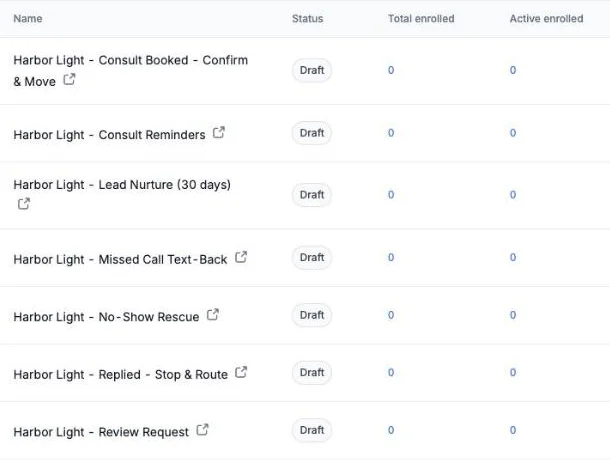
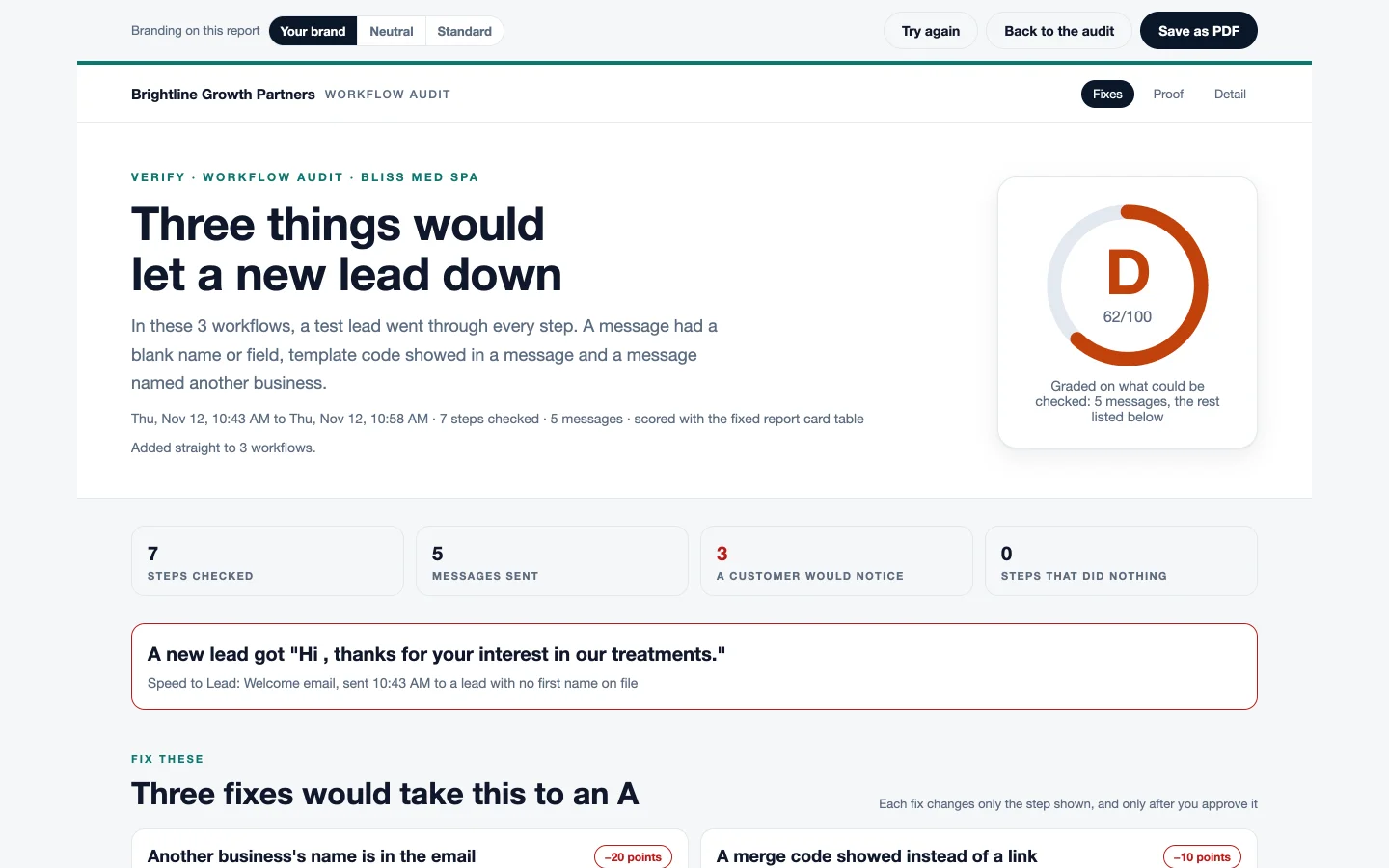
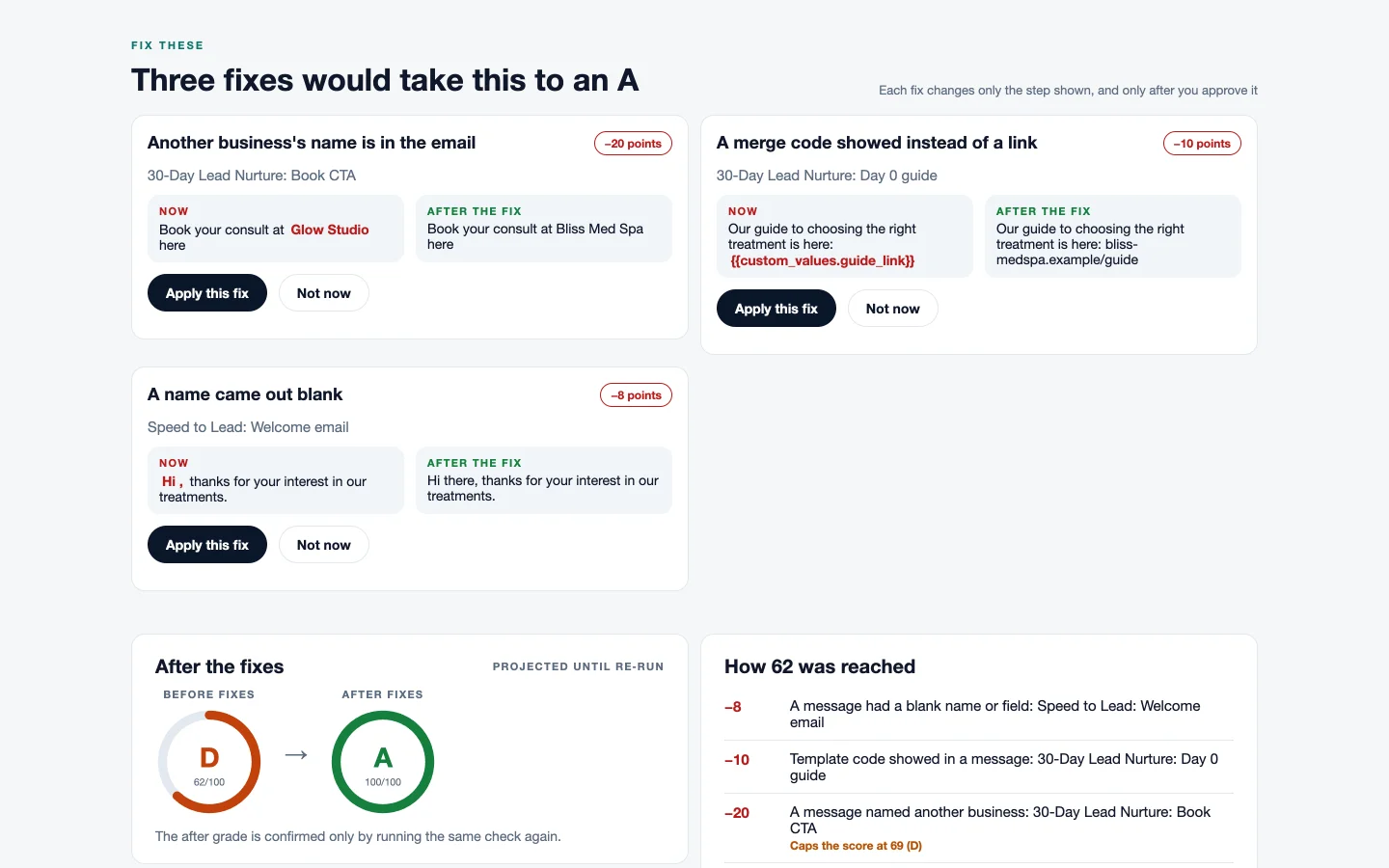
| Testing a build | The workflow audit reads your workflows and ranks what is broken | That, plus Workflow Audit Pro: a test lead goes through, and every text and email is read back word for word |
| Winning a client | Not included | The Assessment, a report on a prospect's website, and a demo chat bot the prospect can text |
| What your client sees | Not included | Reports and handoff pages with your agency's name, logo, colour and contact details |
| Your team | Your VA uses your key on one of your 3 computers | Up to 9 team members with their own logins, 10 computers in total |
| Replies to leads | Not included | The client brain drafts replies for a person to approve, and holds a message that does not fit the lead's record |
| Help | The Members Hub and the Skool community | Both, plus a live group call each month and priority support |
| Price | $97 a month | $497 a month for new members. $97 a month for you. |
What staying subscribed is worth, with no assumptions
New members pay $497 a month. You pay $97. That is $400 a month, or $4,800 a year, for the same Command OS. The rest of this page is what that $400 a month buys.
Ten things you get, and what each one does for your agency
For each one: the problem it is there for, what it does, what it is worth to you, and what is new compared with GHL Command today.
1. The cockpit: board and work queue
Know where every client stands before you open GoHighLevel.
The problem. Past a handful of clients, the build is no longer the hard part. Nothing tells you which account needs you. A build stalls on an approval you did not know you owed, and you find out when the client asks.
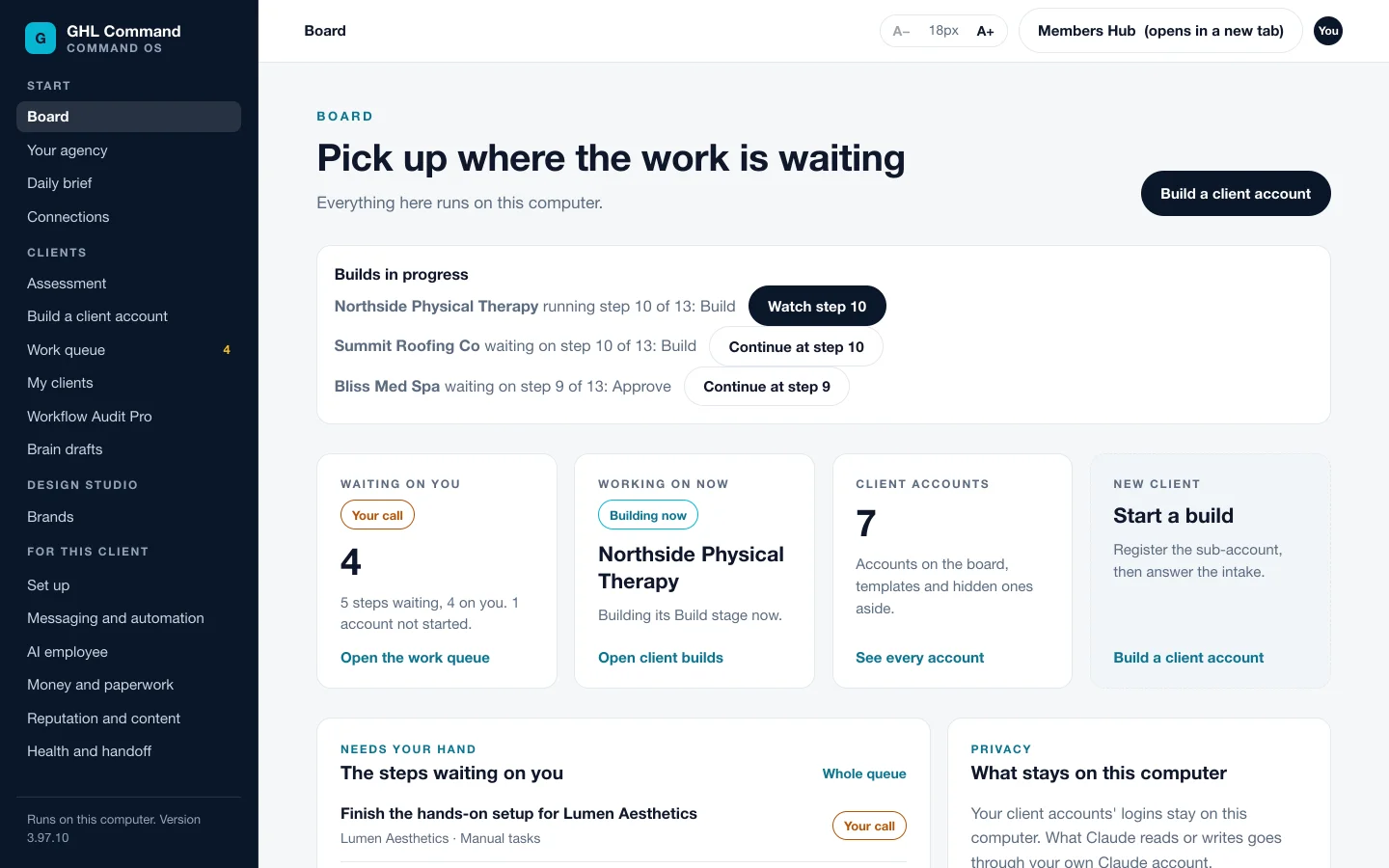
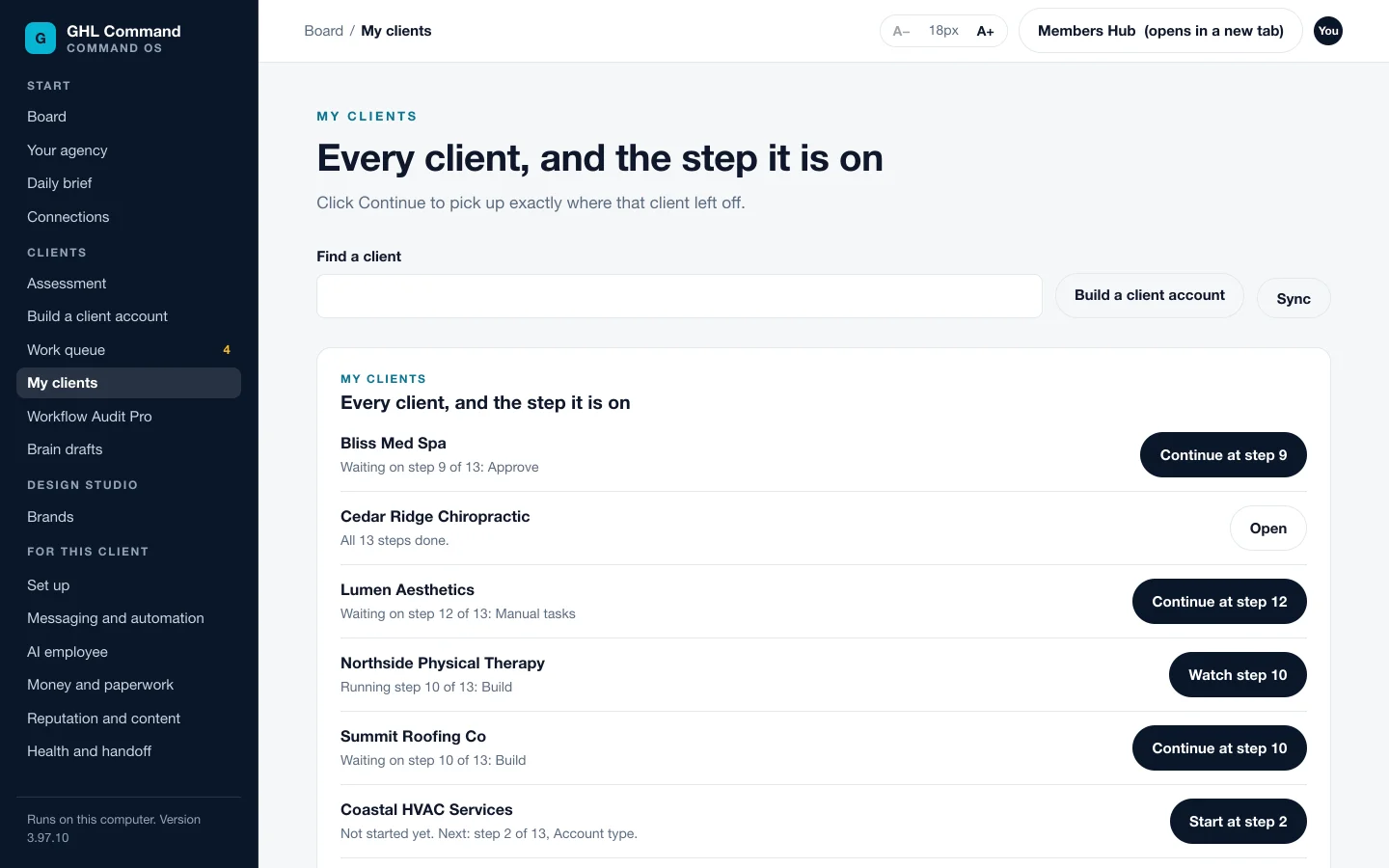
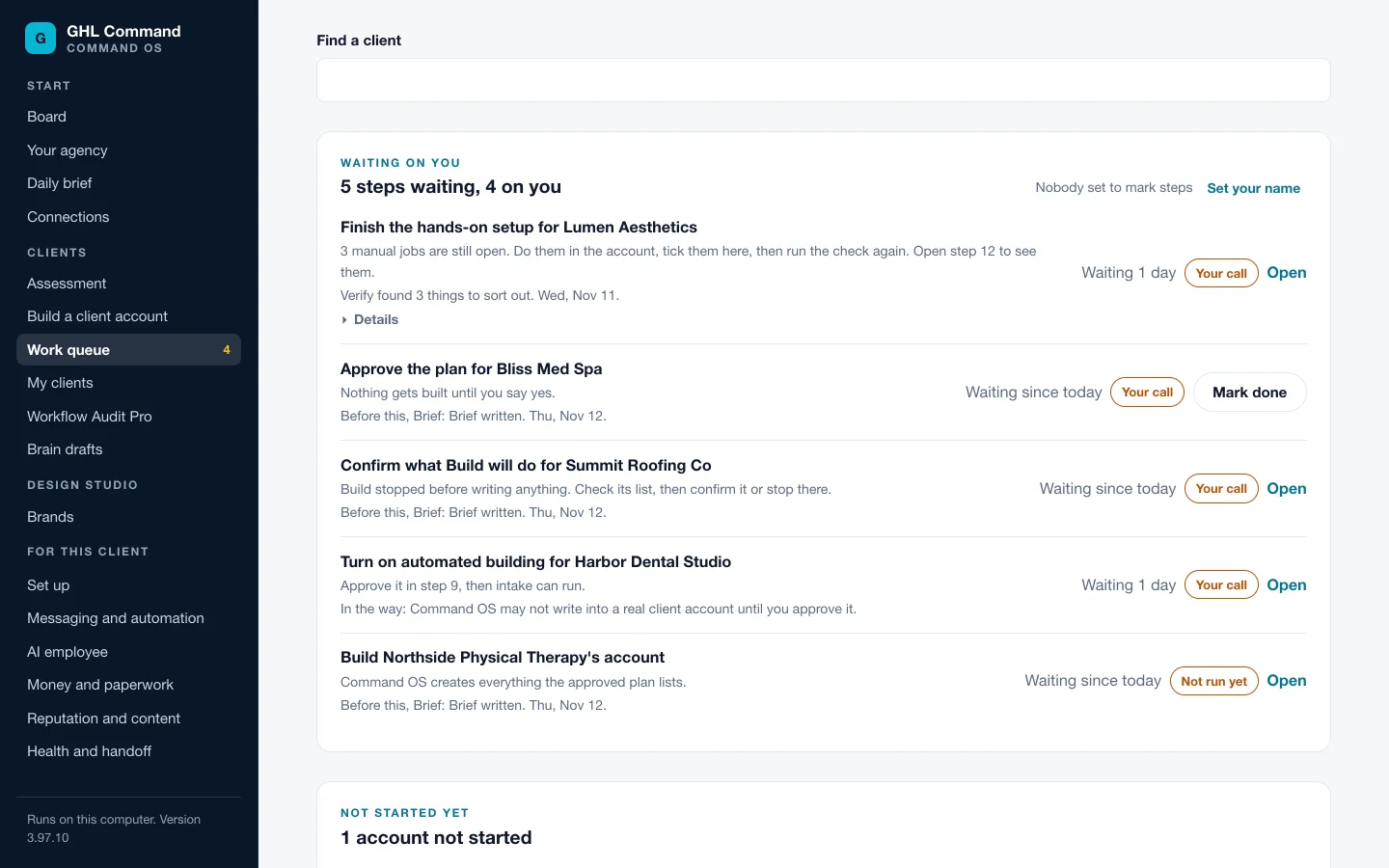
What it does. The cockpit is a screen in your browser that runs on your own computer. The board shows every client account you register. The work queue lists what is waiting, one row per job: the client, the step, and whether it needs you or Command OS. The rows are worked out from the builds themselves, so there is no second list to keep in step. Accounts you mark hidden or template stay out of it.
What it is worth. Checking on your clients stops being one login per client. You open one screen and see which jobs are waiting on you and which are not. A stalled build is seen the day it stalls.
New for you. GHL Command has no cockpit. Today the only way to see across clients is to ask Claude about one account at a time.
2. The morning brief
Start the day with one list of where you are needed.
The problem. The things that cost you a client do not raise an error. A booking sits in an account nobody opened. A renewal is nine days out. An account's key stopped working last week, so it looks quiet.
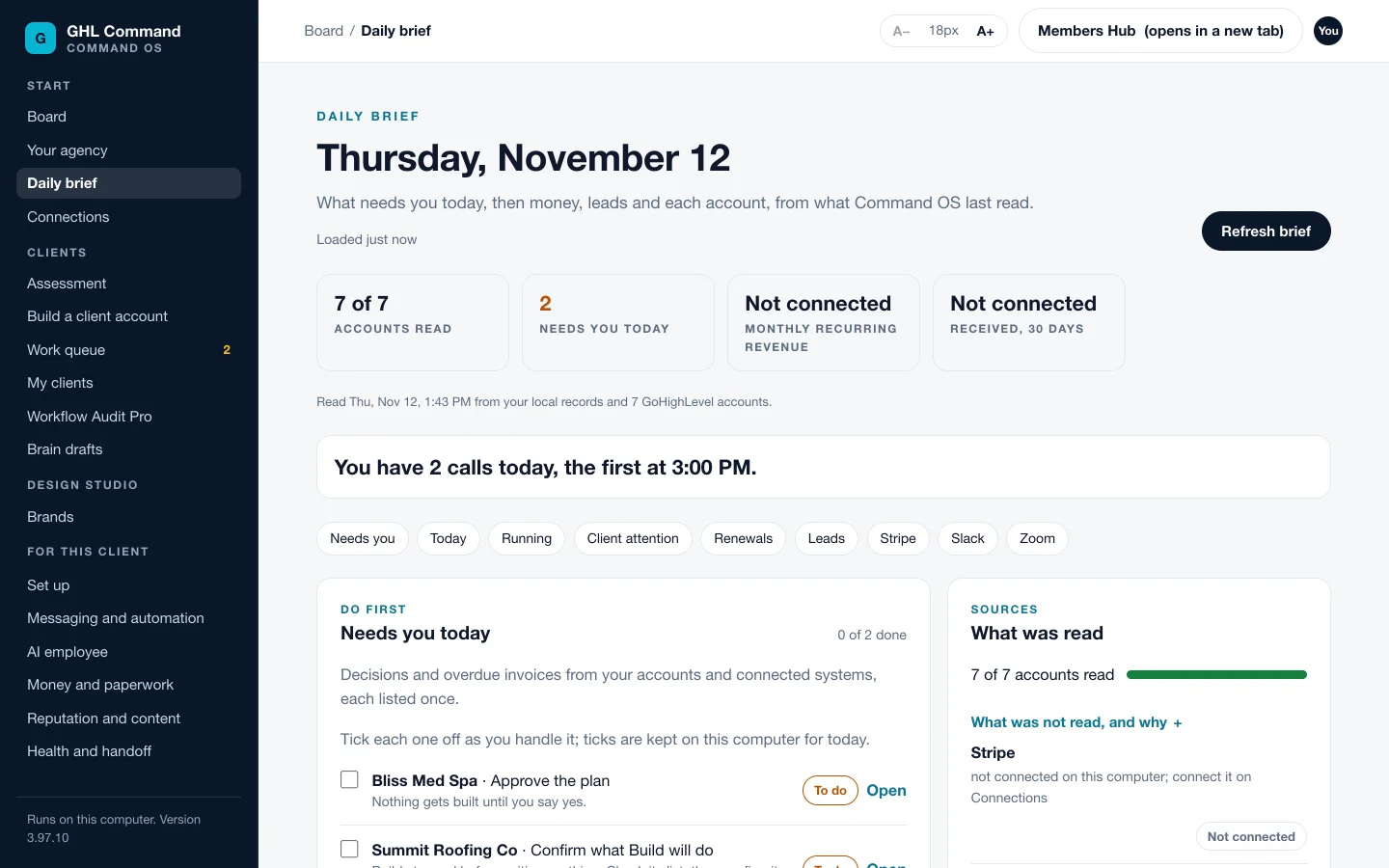
What it does. Ask Claude “What needs me today?” or open Daily brief in the cockpit. It covers every registered client account at once. Today's appointments come first, shown on your clock. Then what is waiting on you, what Command OS is already running, renewals inside 30 days, and new leads since midnight for each client. It always lists what it could not check, and it names any account it could not read. Connect Stripe and the brief adds money received, failed payments and refunds.
What it is worth. The round of opening accounts one by one becomes a single read. A dead key gets named that morning.
New for you. On Command OS the daily brief covers every client account at once.
3. The client Assessment
Sell the build from the prospect's own numbers.
The problem. A prospect says they only need a few automations. You quote from a guess. Three weeks later the build is scoped from your memory of a call.
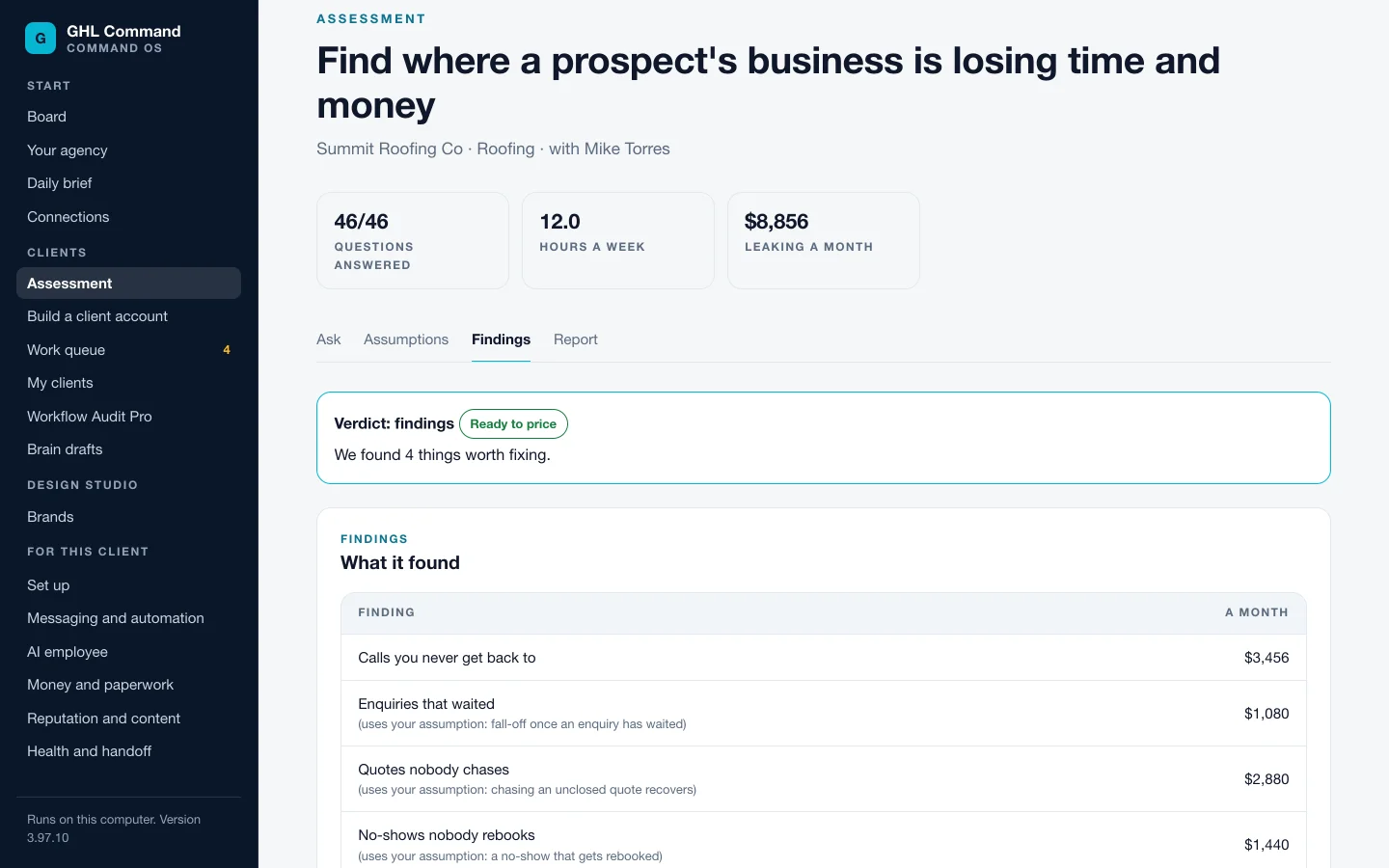
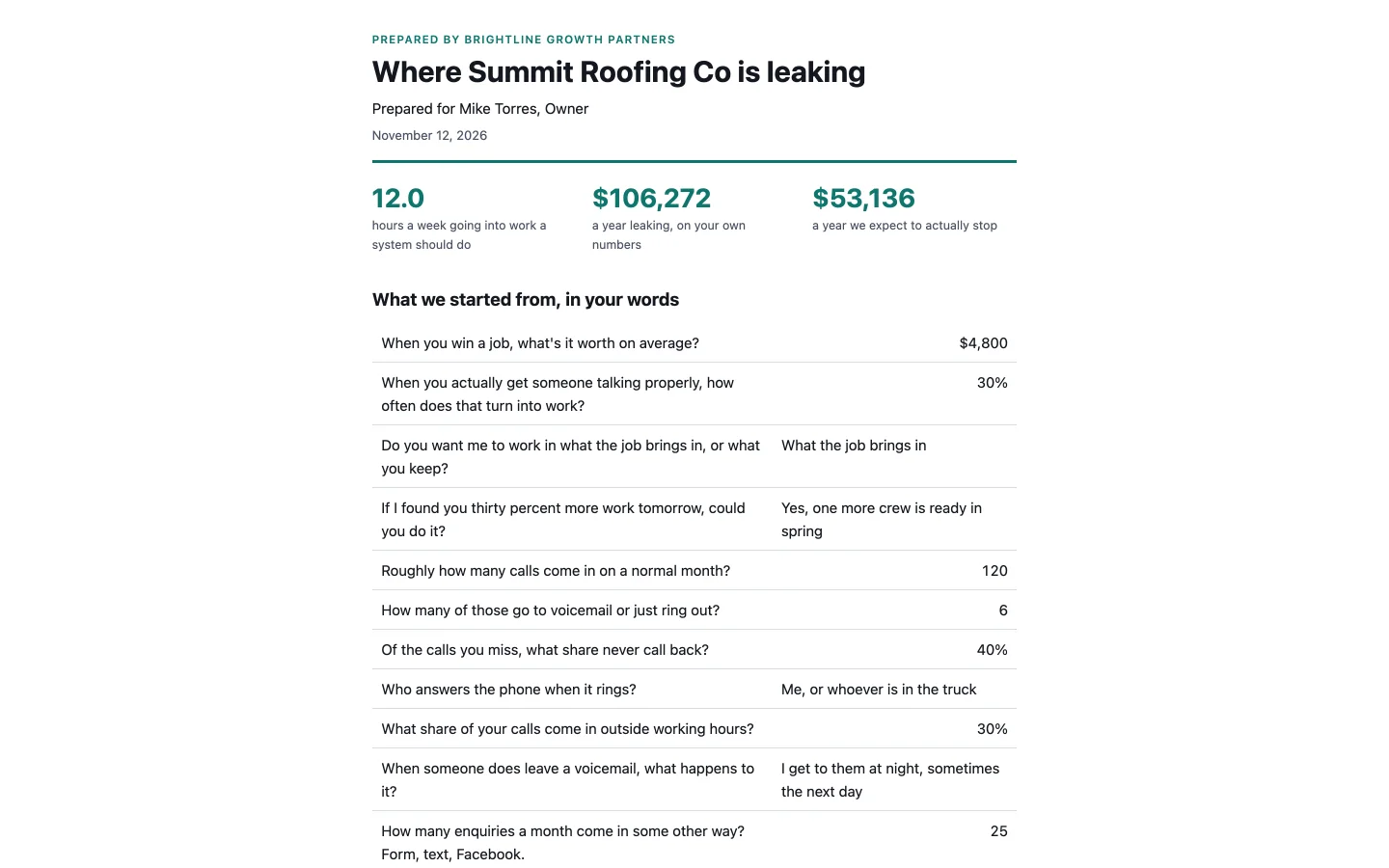
What it does. Run the Assessment with a prospect from the cockpit. It turns their answers into findings with a monthly figure and hours a week, worked out from numbers they gave you. Save it and it lands in your own GoHighLevel: the prospect as a contact, the answers as a note, the deal on an Assessments pipeline. It writes a report with your name, colours, services and prices that mentions us nowhere. When they sign, attach the Assessment to their build. The intake fills in from it, and the plan follows what they bought.
What it is worth. A sales call that ends with a document in your brand and a deal in your pipeline. A build that starts from what was sold, so you are not asking the client the same questions twice.
New for you. The Assessment is not part of GHL Command.
4. Build a client account: the Blueprint build, in thirteen steps
Hand a build to your team and get back one you would put your name on.
The problem. Your VA can click through a build. Proving it is right is the part they can't do, so it comes back to your desk and the next client feels like one too many.
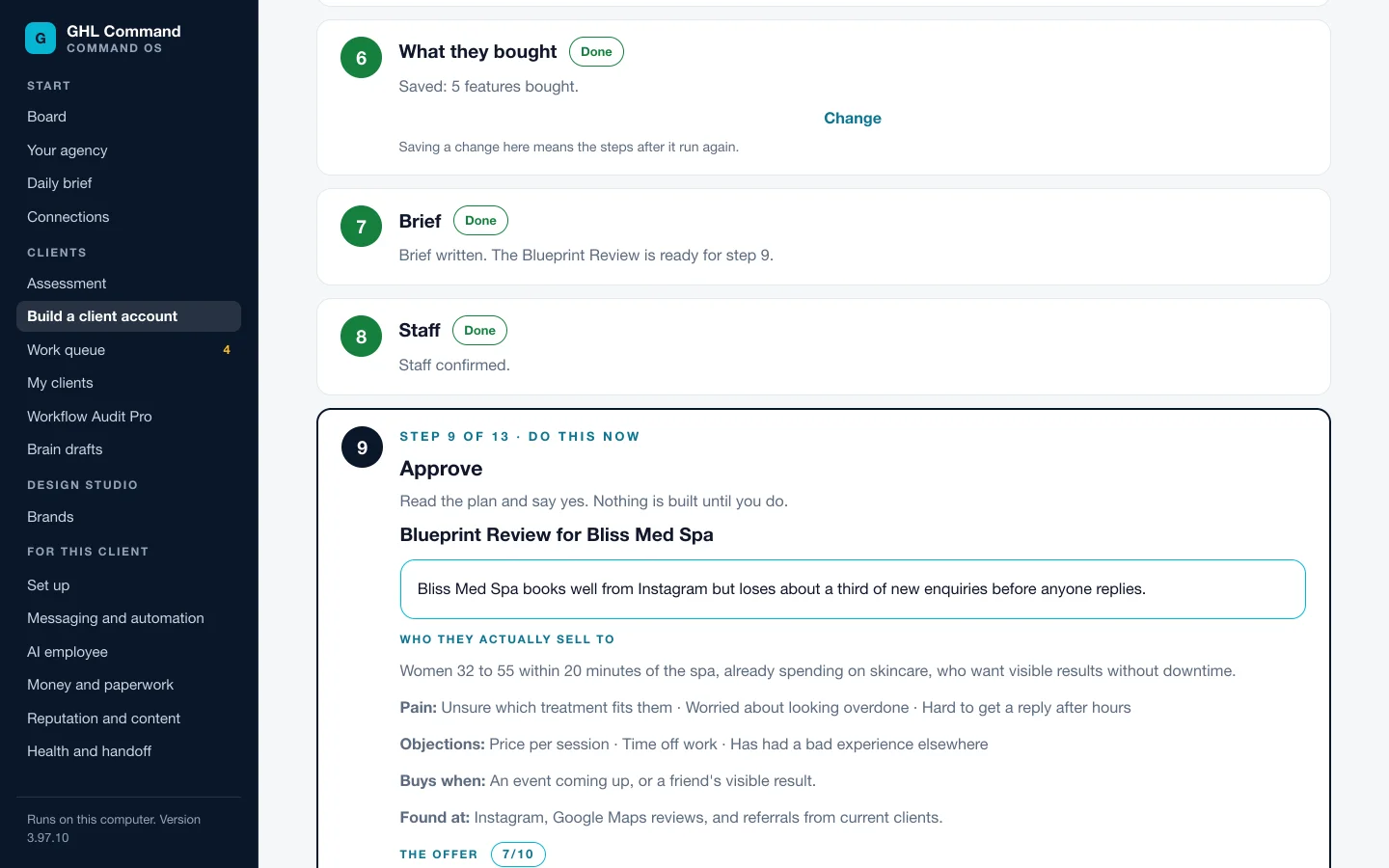
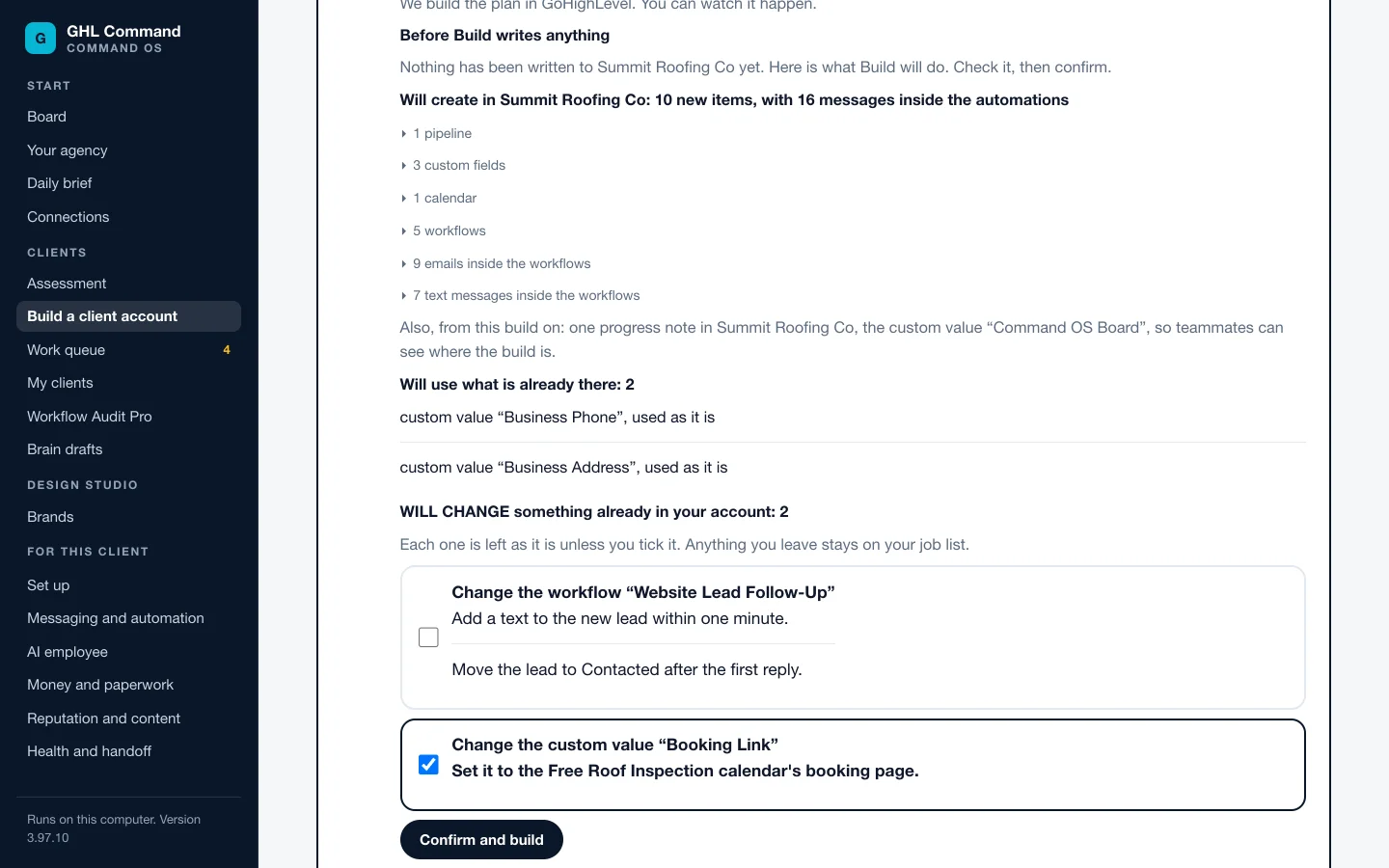
What it does. A client account is built in thirteen numbered steps on one page, in the same order every time. Each step opens when the one before it is done. Someone fills in the intake and what the client bought. Command OS writes the plan. You approve it. Before the build writes anything, it stops and shows what it will create, what it will use, and what it would change. Then it builds. You can watch it happen or leave the page, and the step lists everything it made. Every automation lands as a draft. A check reads the account back and says what GoHighLevel confirms. The jobs only a person can do are listed, and the last step is your sign-off.
What it is worth. By hand, a small account build takes Jerry about 6 hours, and a med spa build 10 to 12. In the cockpit a team member can run the steps. Your part is reading a plan and signing off a build that has been checked.
New for you. Blueprint already plans a build in chat and waits for your approval. New: the same job as steps on a screen someone else can run, the list shown before any write, the check that reads the account back, and the sign-off.
5. Tools for getting new clients
Open the first conversation with something the prospect can see.
The problem. You do not have a prospect's GoHighLevel account, and “we do AI and automation” sounds like every other agency that called them this month.
What it does. Three tools, each for a different point in the sale.
- A report on their website. Give it a web address. It reads the public site the way a visitor would on a phone and writes a one-page report. Each check says what it saw, or says “Not checked” with the reason. The report carries your agency's name and contact details and a button to book a walkthrough with you. You can name up to three competitors to compare. In this version it runs on a Mac.
- A demo chat bot they can text. One sentence about their business becomes a working chat bot on your own demo sub-account. One command removes the demo afterwards; one GoHighLevel setting you reset by hand.
- An audit you can charge for. Run the workflow audit on an account, then have it written up for the person paying the bill: plain words, quick wins first, every number with its assumption beside it. It prints no dollar figure unless you have given it your own close rate and client value.
What it is worth. A first call that starts from their own website instead of your pitch, and a demo chat bot they can text, ready a few minutes after you start it.
New for you. None of the three is part of GHL Command. The audit itself is already yours. The client-ready report is new.
6. Your brand on everything a client sees
The work arrives under your name, not ours.
The problem. Your client is buying from you. A report with a tool's logo on it tells them what you use, and invites them to go around you.
What it does. Fill in Your agency once: name, logo, brand colour, contact details, offers and your minimum price. After that:
- The Workflow Audit Pro report opens in your brand, with your name, logo, colour and contact line. A saved PDF names no product. The choice is remembered for each client.
- The Assessment report carries your name, colours, services and prices.
- The prospect website report carries your name, contact details and booking link.
- The client handoff shows your email, phone or website.
- Design Studio reads a client's real brand off their own website and makes decks and pages in it, then measures the result in a real browser.
What it is worth. Your client opens the report and your name is at the top. At renewal, the work they can see is yours.
New for you. The agency profile, the branded reports and Design Studio are not part of GHL Command.
7. Team logins for your VAs
Your VA does the work under their own name, without your key.
The problem. Today a VA works on your license key, on one of your three computers. They look like you in every record, and if they leave, the key they know is yours.
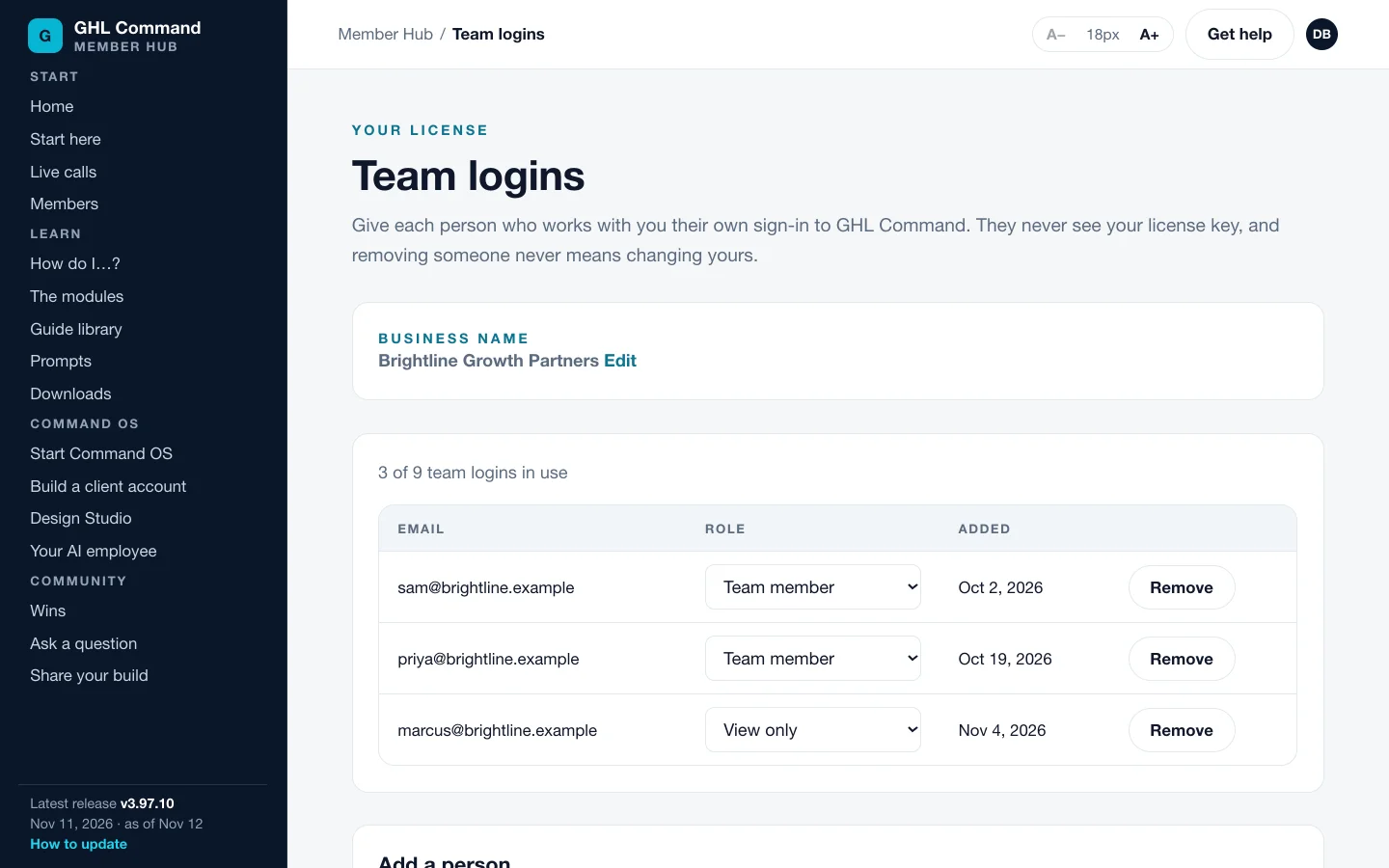
What it does. Add up to 9 team members by email in the Members Hub. Each gets their own login and their own key, on 10 computers in total. Everyone has full access unless you make them view only, so a fix does not wait for you. Remove someone and your own key stays exactly as it is. Every change made through GHL Command is recorded with the signed-in email, on the computer it was made on.
What it is worth. The steps in the cockpit are written on the screen, so the person running a build does not need to be you. See the worked example below for what an hour moved off your desk is worth.
Two things to know. The record of changes is kept on each computer, and no screen shows it across your team yet. And each computer needs Claude Code installed and signed in.
New for you. GHL Command has no team logins.
8. The client brain
Built to hold the message that would make your client look careless.
The problem. A workflow does not know the lead booked yesterday. It sends the booking invite anyway. The lead forwards it to your client, and your client forwards it to you.
What it does. The brain keeps a small memory of each client in your own Supabase account: which leads booked, which opted out, which need a person, and the client's own rules. When a lead replies, it drafts an answer for a person to read and approve. It holds a message that does not fit the lead's record, such as a booking invite to someone who already booked. It never messages anyone who said STOP. It tells a person when a lead needs one.
At launch, sending is off. The brain drafts and holds. A person approves, and a person sends. Every change you ask the brain to make shows you the plan first and waits for your yes.
What it is worth. Replying becomes reading and approving, which a team member can do. A booking invite to a lead who already booked is held for a person instead of going out.
What it needs: your own Supabase account, where the memory is kept, and your own Anthropic key, which it drafts with. You set it up for each client. Your client data stays in your accounts, never ours.
New for you. The client brain comes only with Command OS. It is not in GHL Command.
9. The Members Hub
The answer is written down before you have to ask.
The problem. New software usually means another week of working out where things are, and a team member asking you the questions you just asked someone else.
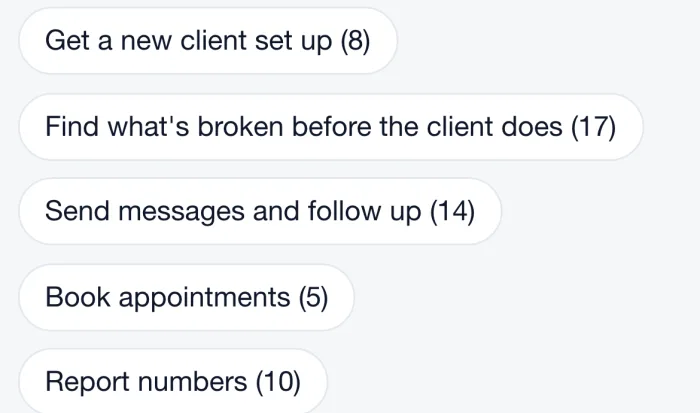
What it does. It is the hub you already sign in to. Guides are sorted by the job you are doing, with a “How do I” page to find the right one. For Command OS it has guides for the cockpit screens and the Command OS tools. Team logins and your billing are there too. Each team member signs in with their own email.
What it is worth. Your team can look things up without you. That is the difference between a team login and a second person who still needs you for every step.
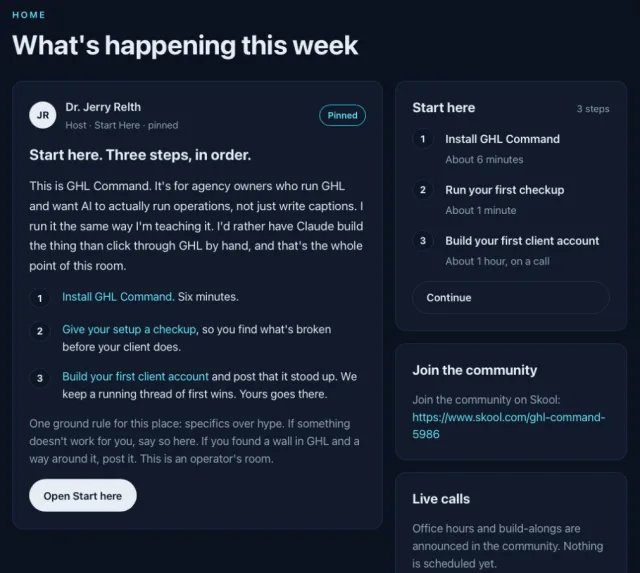
New for you. Same hub, same login. The Command OS guides, Team logins and the Live Calls section are the additions.
10. The monthly call
You are not running this alone.
The problem. A lot of what slows an agency owner down is a question another owner has already answered. Working alone, you guess.
What it does. Command OS members get a live group call each month. It is listed in the Live Calls section of the Members Hub, which only Command OS members see. The first call is Thursday, December 10, 2026, at 8:00 AM Central time (7:00 AM Arizona). The link is in your Members Hub. It is a group call, not one-on-one time.
What it is worth. A place to bring the account that is stuck and hear how other owners are using the same screens.
New for you. The monthly call and priority support are not part of GHL Command.
Also included
Tools to build a client a chat bot that answers from what the business tells it. The bot is created to draft replies for a person to send, and letting it send on its own is your call. Connections for Stripe and Slack, which feed the daily brief. And the Voice AI phone agent tools. That path is newer and has not been proven end to end on one agent, so test it with a call from your own phone first.
What an hour off your desk is worth, in your own numbers
This is an example, not a result. No customer has measured Command OS yet, so we are not going to quote one. Change every number to yours.
Example output, from the numbers beside it.
20 hours
a month moved off your desk, from your numbers
How it is worked out: hours a week times 4 weeks; hours times each rate; builds times your fee. It assumes the hours you hand over go to work you would bill or sell. Nobody can promise that. These are your own sums. No customer has measured them yet.
The one number here that is not an example: you pay $97 a month, and a new member pays $497 for the same Command OS.
Is this real? What is proven, and what is not yet.
You already pay us, so you get the straight version. You are not being asked to pay more to find out.
Proven
- The client build has been taken from the first step to sign-off on a real GoHighLevel sub-account kept for testing, set up as a wellness clinic. Nothing was switched on, and the build was undone afterwards.
- Blueprint and the workflow audit are what you already run today.
- We checked our own accounts first. The numbers are on the right.
Not yet
- No customer has reported a result from Command OS. You would be among the first to run it on real clients.
- The other industries use the same thirteen steps, and none has been taken to sign-off on a real account yet.
- The client brain does not send. That stays off until it has earned it. It has only just been cleared for real client accounts, and no run on a live client is on record yet, so start it on one client.
- The cockpit's Windows launcher is covered by automated tests. We have not yet tried it ourselves on a Windows computer.
- The Voice AI phone agent path has not been proven end to end on one agent.
Our read-only check of all 23 of our own GoHighLevel accounts, September 1, 2026. The repairs were our own work. One person does not catch that by opening accounts by hand, which is why the board, the brief and the audit exist.
Members on GHL Command, which Command OS is built on.
“It takes everything GoHighLevel can do and puts it one sentence away, instead of buried five clicks deep.”
Paul Meyers, PM Consulting
“I've already set it up, I'm using it and it works perfectly.”
Andres G., agency owner
What you need to run it
- A GoHighLevel plan with API accessUnlimited at $297 a month, or higher. You already have this if GHL Command works for you today. GoHighLevel bills it separately.
- Claude Code on the same computer as the cockpitThe cockpit runs on your own computer and opens in your browser. The steps that use Claude run through Claude Code, on your own Claude account.
- For the client brain: two accounts of your ownA Supabase account, where its memory is kept, and an Anthropic key, which it drafts with. Both are billed to you by those companies.
- A Mac, for the prospect website reportThat one tool runs on a Mac in this version.
- For the demo chat bot: a demo sub-accountIt needs a phone number, A2P approval, and GoHighLevel's AI Employee switched on, which GoHighLevel bills separately.
How to have Command OS at $97
The cut-off is 12:01 AM Arizona time on Thursday, November 19. Find your case below.
You pay $97 a month now
You are set. On the 19th your membership moves to Command OS at $97, for as long as you stay subscribed. Same key, same login. There is nothing to buy and nothing to sign.
The one way to lose it is to cancel. The $97 price ends with the subscription.
You are in the $7 trial
Your membership becomes $97 a month by itself when the trial ends. If that happens before the cut-off, you move with everyone else. A trial still running at the cut-off does not count. Want to start your $97 membership early so you are included? Write to [email protected] by Wednesday, November 18 at 5 PM Arizona time.
Want it to start sooner? Write [email protected] by Wednesday, November 18 at 5 PM Arizona time and we will start your $97 membership early. You pay the $97 once, not twice. Do not use the join button.
You are behind on a payment
Pay it within the 7-day window and you are still in. Billing is in the Members Hub.
Not a member yet?
Join GHL Command at $97 a month before the cut-off. You get the full GHL Command today, and on the 19th your membership becomes Command OS at the same $97.
Wait, and the price is $497 a month. The first 20 new members get Founders pricing at $297 a month.
Your first month is guaranteed. Use GHL Command on one real client build inside 30 days. If it does not save you at least 5 hours on that build, email [email protected] and we refund your first month in full. Read the terms.
Needs GoHighLevel's $297 a month plan or higher, for API access. Works with your own Claude account, which Anthropic bills separately.
GHL Command today. Command OS from November 19, at the same price, for as long as you stay subscribed.
Join at $97 before the 19th$97 today, then $97 a month until you cancel. Choose the $97 membership, not the $7 trial.
- Cut-off: 12:01 AM Arizona time, Thursday, November 19.
- After that: $497 a month, or $297 for the first 20.
- Cancel any time from Billing in the Members Hub.
- Already on the $7 trial? Do not join again. See “You are in the $7 trial” above.
Questions members are asking
Do I have to do anything on the 19th?
No. If you are a paying $97 member at the cut-off, your membership moves to Command OS on its own. Same key, same login, same $97. To use the cockpit you need Claude Code on the same computer, and the Members Hub has the steps.
Why are you giving this to $97 members?
Because we said we would. In October we told the Skool community that anyone paying $97 on the day Command OS opens would move to it at $97 while they stay subscribed. This is that promise being kept.
Does it cost me anything extra to run?
Command OS itself is $97 a month for you, the same as today. The cockpit steps that use Claude run on your own Claude account, as GHL Command does now. If you switch on the client brain, it uses your own Supabase account and your own Anthropic key, and those two companies bill you for what it uses.
Will my price go up later?
Your Command OS price is $97 a month for as long as you stay subscribed. If you cancel, that price ends with the subscription.
Am I one of the Founders members?
No. Founders pricing is for the first 20 new members, who pay $297 a month. You pay $200 a month less than they do for the same Command OS.
Is the brain going to text my clients' leads on its own?
No. At launch, sending is off. The brain drafts a reply and a person approves and sends it. It holds a message that does not fit the lead's record, and it never messages anyone who said STOP.
Do I have to use the cockpit?
No. Everything you do in a Claude chat today keeps working the same way. The cockpit is added on top, for the days you want one screen instead of a conversation.
Is the cockpit a website you host?
No. It runs on your own computer and opens in your browser. Your GoHighLevel keys stay on your computer and are never sent to us.
Can my VA really run a build?
A team member with full access can run the numbered steps in the cockpit and press the fix buttons without waiting on you. You still approve the plan and sign off the build. A view-only team member can read but cannot change an account or open the cockpit.
Can I see who on my team changed what?
Every change is recorded with the signed-in email, on the computer it was made on. No screen shows that record across your team yet.
I am on the $7 trial. Am I included?
Yes, if your trial has become the $97 membership before the cut-off. It does that by itself when the trial ends. A trial still running at 12:01 AM Arizona time on November 19 does not count. Want it to start sooner? Write [email protected] by Wednesday, November 18 at 5 PM Arizona time and we will start your $97 membership early. You pay the $97 once, not twice.
One screen for every client, a team that can do the work, and the price you already pay.
If you are a member, stay subscribed and it arrives on November 19. If you are not, join at $97 before 12:01 AM Arizona time that day.
After the cut-off new members pay $497 a month, or $297 for the first 20. Needs GoHighLevel's $297 a month plan or higher.